|
The developer must understand the ELT file structure before creating this process. An ELT file is essentially a zip file containing multiple files that are crucial for opening a Cimatron document.
To write data into an ELT file, developers must perform the following steps:
-
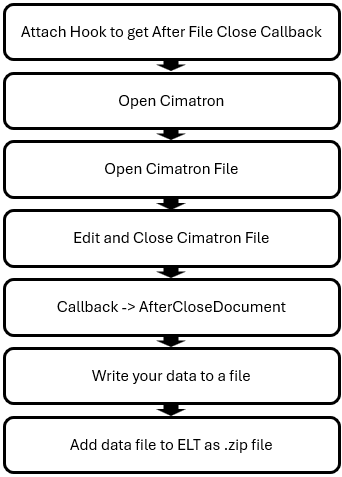
Attach a Hook to Cimatron
Utilize the Cimatron API to attach a hook―This will enable notifications before and after a file is saved, as well as when a document is closed.
-
Use IPdmHooks::AfterCloseDocument:
The AfterCloseDocument function is triggered after the document is closed―This is the point at which users can write their own data into the ELT file.
Before adding data, users must be familiar with the ELT File Structure.
-
Add Data to the ELT File:
When the AfterCloseDocument function is called, users should open the ELT file as a zip file―Users can then add their own files to the ELT file.
The workflow diagram on the right outlines this process:
|
|
